Move and zoom: drag the image to move it, or double-click to zoom in. Hold Ctrl (⌘ on a Mac) and scroll to zoom. On a touch screen, drag to move and pinch to zoom. With a keyboard, Tab to the image, then use the ← ↑ → ↓ keys to move, + and − to zoom, and 0 to reset. The buttons and slider above do the same thing, including the four arrow buttons for moving the image.
Open the full-size image in its own pageDescription of this slide
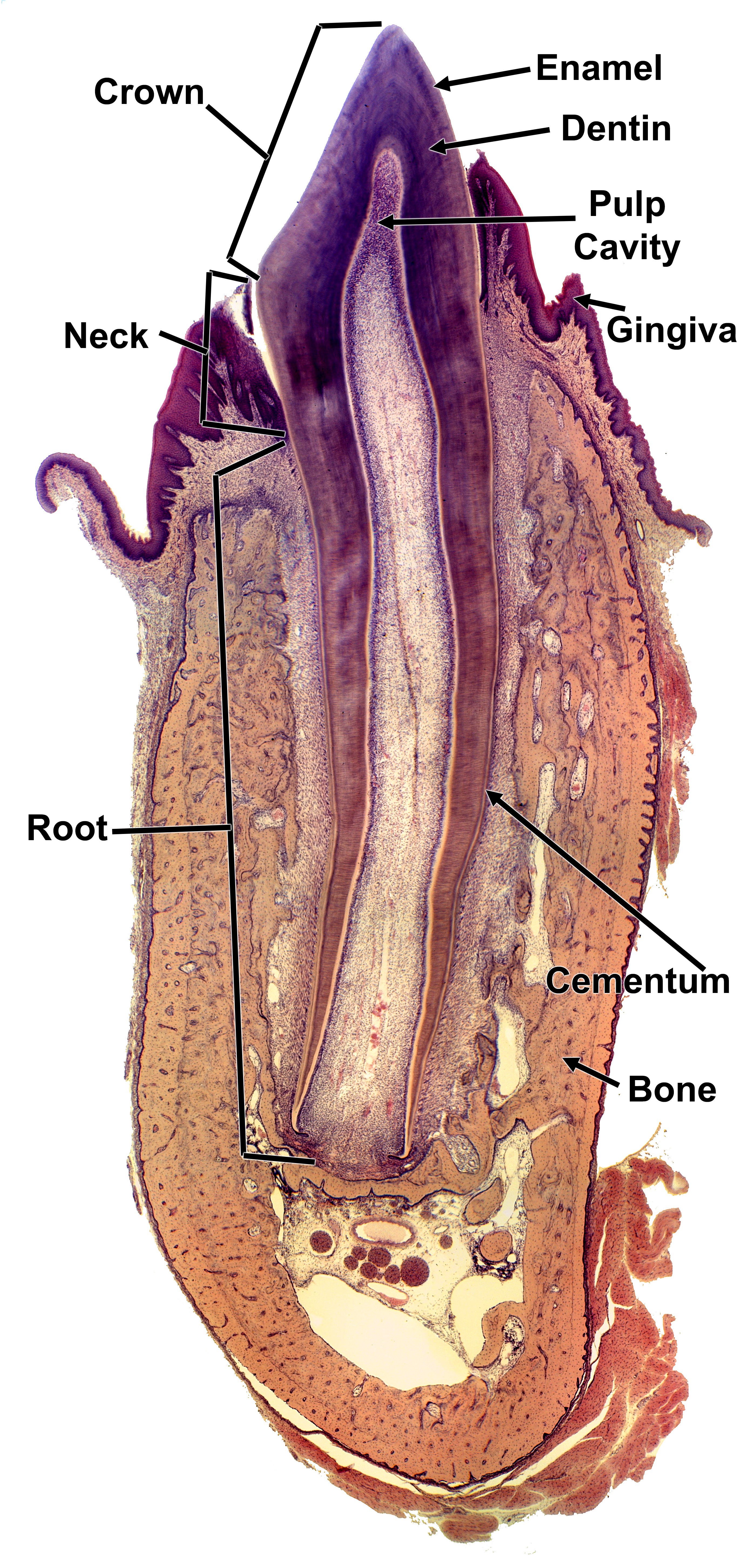
Low-power view of a tooth cut lengthwise, still sitting in its jaw bone. The crown is the part above the gum, and the root is the part below it, with the neck between them. From the outside in: enamel covers the crown (the thin outer layer, often lost in processing), dentin makes up most of the tooth, and the pulp cavity is the pale central space filled with soft tissue. Cementum is a thin layer on the outside of the root. The gingiva (gum) is the dark purple lining at the top, and the bone around the root is the pink-orange tissue.